Rekeying a Kwikset SmartKey resets which key opens your deadbolt without replacing the hardware. The cylinder uses a patented side-locking bar instead of a traditional pin stack, so a homeowner or a locksmith can retire an old key and assign a new one using the manufacturer’s SmartKey tool and the current working key. It is one of the simplest ways to take back control of who can enter your home.
A handed-out spare key you never got back, a previous owner who still has a copy, a roommate who moved out — these are the moments when your front door stops feeling like yours. Replacing every lock is one answer, but rekeying a Kwikset SmartKey gives you the same control while keeping the deadbolt you already trust. As the mobile locksmith service in Mesa that handles these resets across the East Valley, we want to walk you through how the technology works, when to use it, and where its limits are. Keep reading and you will know exactly what is happening inside that little orange-keyed cylinder.
What Is Kwikset SmartKey Technology?
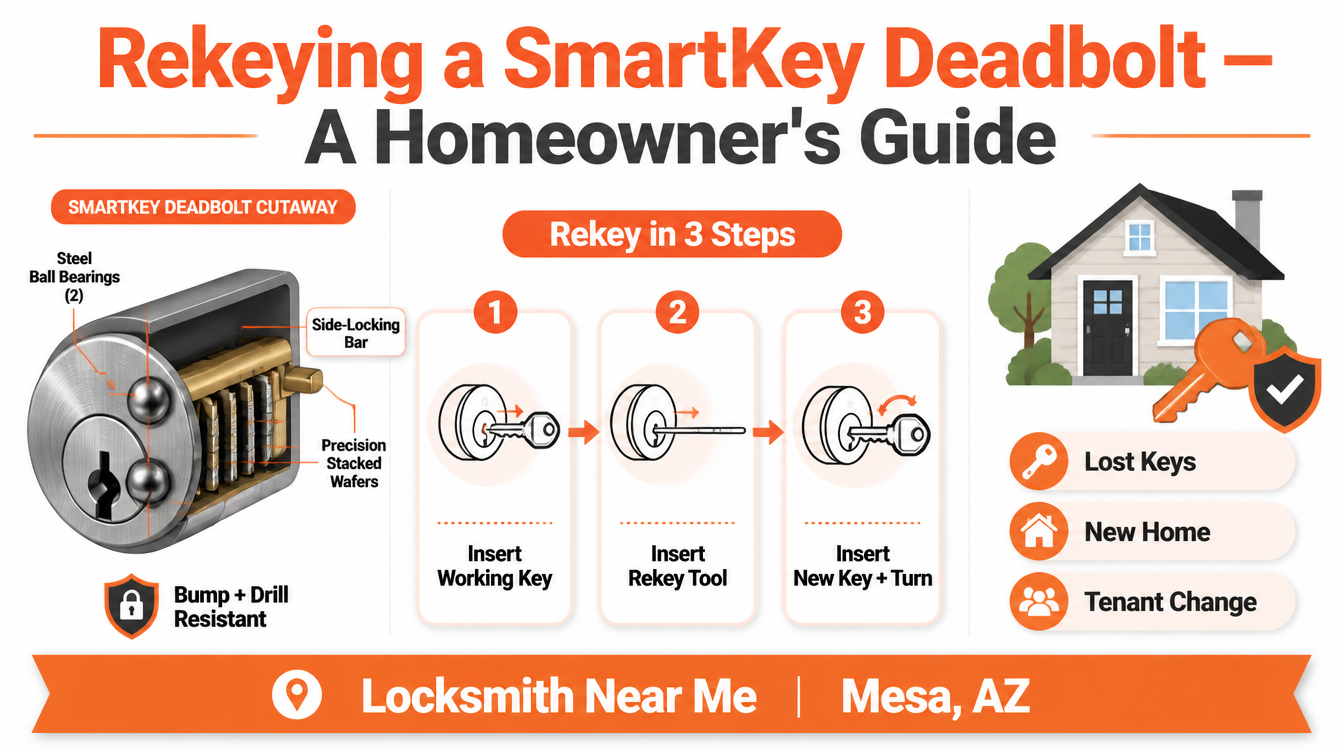
Kwikset introduced SmartKey Security in 2008 as the first do-it-yourself rekeying system on the consumer market. Instead of the brass pin-and-tumbler stack found in most older locks, a SmartKey cylinder uses a side-locking bar paired with sliding aluminum wafers. When the right key lifts those wafers to the correct heights, the bar drops into a channel and the plug turns. Reprogramming the lock simply repositions where that bar engages — no re-pinning, no cylinder removal from the door.
The table below compares SmartKey rekeying with the older pin-tumbler approach our certified technicians still service regularly.
| Feature | Kwikset SmartKey Security | Traditional Pin-Tumbler |
|---|---|---|
| Rekeying method | Side-locking bar reset with the SmartKey tool | Re-pinning the cylinder with new pin stacks |
| Tool required | Manufacturer SmartKey tool | Full pinning kit and plug follower |
| Current working key needed | Yes — required to reset | Not required (cylinder is re-pinned) |
| Bump resistance | BumpGuard side-bar design | Often vulnerable without upgrades |
| Drill resistance | Two hardened steel ball bearings in the face | Varies by hardware grade |
| Master-key capability | Not supported | Supported via bitting hierarchy |
| Cylinder material | Aluminum wafers | Brass pins |
| Independent certification | Meets/exceeds ANSI/BHMA; Grade 1 deadbolts available | Grade varies by model |
| Best handled by | Homeowner or locksmith | Locksmith with pinning experience |
How the Side-Locking Bar Works
In a standard cylinder, spring-loaded pins must line up at a shear line. SmartKey replaces that with a sidebar that reads a row of wafers. The geometry is what makes reprogramming possible: a small internal learning slot lets the wafers “remember” a new key pattern. This is the same principle that makes rekeying your home locks far cleaner than dismantling hardware. According to Kwikset’s own SmartKey Security documentation, the patented design is built specifically to resist picking and bumping.
BumpGuard and Drill Resistance
Two features set SmartKey apart on the security side. BumpGuard counters lock bumping, a method where a specially cut key is tapped to jump pins. Because there are no traditional pins, that attack has nothing to act on. The cylinder also seats two steel ball bearings at the face to improve drill resistance. Many SmartKey deadbolts are tested to ANSI/BHMA Grade 1, the highest residential rating, which you can verify through the Builders Hardware Manufacturers Association. When we install a new handleset and deadbolt, this rating is one of the first things we point out.
How Rekeying a Kwikset SmartKey Actually Works
The process is intentionally short. With the working key inserted and turned a quarter-turn, the SmartKey tool is pressed into the small port beside the keyway. That disengages the wafers from their guide pins. The old key comes out, the new key goes in fully, and a controlled turn teaches the cylinder its new pattern. Once the key returns to the starting position, the lock recognizes only the new key. Kwikset publishes the exact step-by-step rekey instructions for each model.
We see homeowners try this and run into one recurring snag: skipping the full key insertion, which leaves the wafers half-set. That is usually why a self-rekeyed lock “forgets” the key soon after. Our mobile technicians in Mesa carry replacement cylinders for exactly these cases.
What You Need Before Rekeying
You need the current working key. SmartKey is designed so the cylinder can only be reset by someone who already has access — a deliberate security choice. If the only key is lost or was never returned, the lock cannot be reprogrammed through the standard method, and the right move is a cylinder swap or a full lock replacement. When tenants change over, we often pair a rekey with a check of the mailbox locks so the whole property turns over cleanly.
When to Rekey a Kwikset SmartKey
Reprogramming the cylinder makes sense in several everyday situations:
- Moving into a previously owned home, where you cannot account for every copy ever made
- A lost or stolen key that may be tied to your address
- A roommate, tenant, or house cleaner whose access you want to retire
- Aligning multiple doors to one key after adding matching SmartKey hardware
- Routine turnover for rental units, paired with keyless access control on the business side
For Mesa rentals and small offices, we frequently combine a residential rekey with exit door panic hardware checks and a fresh set of replacement keys for vehicles in the same visit.
SmartKey Strengths and Limitations Homeowners Should Know
We believe a homeowner makes better decisions with the full picture, so here is the balanced view from our bench. On the plus side, SmartKey resists bumping and drilling, reprograms without tools beyond the included pin, and reaches Grade 1 ratings on many deadbolts. The trade-offs: the wafers are aluminum rather than brass, the system does not support true master keying, and a small number of forced-bypass tools exist for SmartKey cylinders. Independent professional groups such as ALOA Security Professionals Association track these developments, which is part of why our technicians keep their training current. None of this disqualifies SmartKey — it simply means the hardware should be installed correctly and inspected over time, the same care we give every garage door lock and track.
Pro Tip From Our Mesa Locksmith Bench
In Arizona’s heat, the thing that quietly degrades a SmartKey cylinder is fine desert dust working into the keyway alongside thermal expansion. When we get called for a lock that “won’t take the rekey,” roughly half the time the cylinder is gritty rather than broken. Our pro tip: before reprogramming, exercise the lock with the working key a dozen times and apply a dry graphite or PTFE lubricant — never an oil-based spray, which traps dust and gums the wafers. If the action is still sticky, that is the signal to call us for a professional rekey or cylinder service rather than forcing the tool. We would always rather inspect a cylinder than replace one you did not need to.
Frequently Asked Questions
Taking Control of Who Holds Your Keys in Mesa
The whole point of rekeying a Kwikset SmartKey is control: you decide which key opens your door today, without throwing away hardware that is already built to a Grade 1 standard. Done right, the cylinder forgets every old copy and answers only to the key in your hand. Done in a hurry, a half-finished reset can leave you locked out later — which is the situation we would rather help you avoid entirely. If you are also weighing a full security refresh, our guide to upgrading your deadbolt and handleset pairs naturally with this one.
When you want it handled correctly, our owner-operated shop has served homes and businesses across the East Valley, and you can reach out to our Mesa team to schedule a professional rekeying service. Call Locksmith Near Me Mesa at (480) 418-7560, see our work and reviews on our Google Business listing, and stop by the same Google Maps location to confirm you are working with the local team that knows SmartKey hardware inside and out. Let us reprogram your SmartKey properly and put your keys back where they belong — with you.