
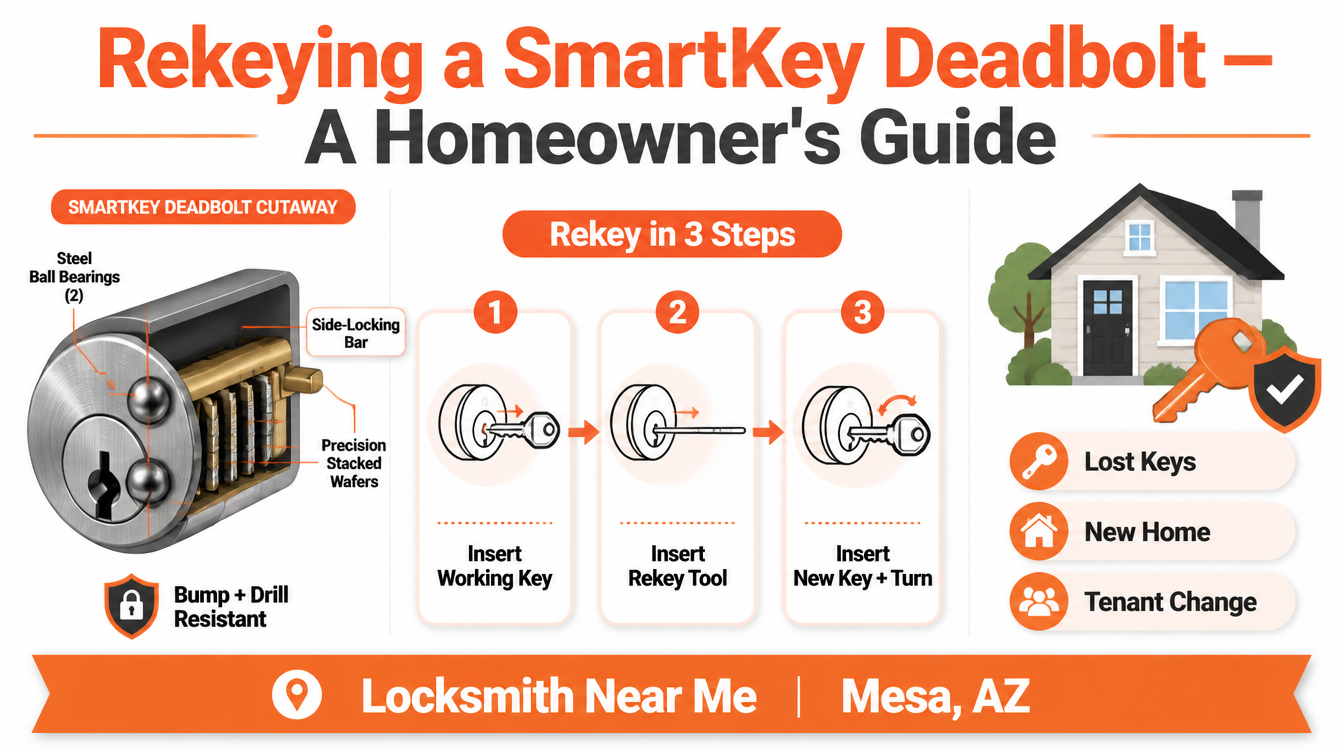
Infographic on rekeying a Kwikset SmartKey deadbolt by Locksmith Near Me Mesa, AZ

Rekeying a Kwikset SmartKey: A Homeowner’s Guide to SmartKey Technology

Rekeying a Kwikset SmartKey resets which key opens your deadbolt without replacing the hardware. The cylinder uses a patented side-locking bar instead of a traditional pin stack, so a homeowner or a locksmith can retire an old key and assign a new one using the manufacturer’s SmartKey tool and the current working key. It is one of the simplest ways to take back control of who can enter your home.

A handed-out spare key you never got back, a previous owner who still has a copy, a roommate who moved out — these are the moments when your front door stops feeling like yours. Replacing every lock is one answer, but rekeying a Kwikset SmartKey gives you the same control while keeping the deadbolt you already trust. As the mobile locksmith service in Mesa that handles these resets across the East Valley, we want to walk you through how the technology works, when to use it, and where its limits are. Keep reading and you will know exactly what is happening inside that little orange-keyed cylinder.

What Is Kwikset SmartKey Technology?

Kwikset introduced SmartKey Security in 2008 as the first do-it-yourself rekeying system on the consumer market. Instead of the brass pin-and-tumbler stack found in most older locks, a SmartKey cylinder uses a side-locking bar paired with sliding aluminum wafers. When the right key lifts those wafers to the correct heights, the bar drops into a channel and the plug turns. Reprogramming the lock simply repositions where that bar engages — no re-pinning, no cylinder removal from the door.

The table below compares SmartKey rekeying with the older pin-tumbler approach our certified technicians still service regularly.

Feature Kwikset SmartKey Security Traditional Pin-Tumbler
Rekeying method Side-locking bar reset with the SmartKey tool Re-pinning the cylinder with new pin stacks
Tool required Manufacturer SmartKey tool Full pinning kit and plug follower
Current working key needed Yes — required to reset Not required (cylinder is re-pinned)
Bump resistance BumpGuard side-bar design Often vulnerable without upgrades
Drill resistance Two hardened steel ball bearings in the face Varies by hardware grade
Master-key capability Not supported Supported via bitting hierarchy
Cylinder material Aluminum wafers Brass pins
Independent certification Meets/exceeds ANSI/BHMA; Grade 1 deadbolts available Grade varies by model
Best handled by Homeowner or locksmith Locksmith with pinning experience

How the Side-Locking Bar Works

In a standard cylinder, spring-loaded pins must line up at a shear line. SmartKey replaces that with a sidebar that reads a row of wafers. The geometry is what makes reprogramming possible: a small internal learning slot lets the wafers “remember” a new key pattern. This is the same principle that makes rekeying your home locks far cleaner than dismantling hardware. According to Kwikset’s own SmartKey Security documentation, the patented design is built specifically to resist picking and bumping.

BumpGuard and Drill Resistance

Two features set SmartKey apart on the security side. BumpGuard counters lock bumping, a method where a specially cut key is tapped to jump pins. Because there are no traditional pins, that attack has nothing to act on. The cylinder also seats two steel ball bearings at the face to improve drill resistance. Many SmartKey deadbolts are tested to ANSI/BHMA Grade 1, the highest residential rating, which you can verify through the Builders Hardware Manufacturers Association. When we install a new handleset and deadbolt, this rating is one of the first things we point out.

How Rekeying a Kwikset SmartKey Actually Works

The process is intentionally short. With the working key inserted and turned a quarter-turn, the SmartKey tool is pressed into the small port beside the keyway. That disengages the wafers from their guide pins. The old key comes out, the new key goes in fully, and a controlled turn teaches the cylinder its new pattern. Once the key returns to the starting position, the lock recognizes only the new key. Kwikset publishes the exact step-by-step rekey instructions for each model.

We see homeowners try this and run into one recurring snag: skipping the full key insertion, which leaves the wafers half-set. That is usually why a self-rekeyed lock “forgets” the key soon after. Our mobile technicians in Mesa carry replacement cylinders for exactly these cases.

What You Need Before Rekeying

You need the current working key. SmartKey is designed so the cylinder can only be reset by someone who already has access — a deliberate security choice. If the only key is lost or was never returned, the lock cannot be reprogrammed through the standard method, and the right move is a cylinder swap or a full lock replacement. When tenants change over, we often pair a rekey with a check of the mailbox locks so the whole property turns over cleanly.

When to Rekey a Kwikset SmartKey

Reprogramming the cylinder makes sense in several everyday situations:

  • Moving into a previously owned home, where you cannot account for every copy ever made
  • A lost or stolen key that may be tied to your address
  • A roommate, tenant, or house cleaner whose access you want to retire
  • Aligning multiple doors to one key after adding matching SmartKey hardware
  • Routine turnover for rental units, paired with keyless access control on the business side

For Mesa rentals and small offices, we frequently combine a residential rekey with exit door panic hardware checks and a fresh set of replacement keys for vehicles in the same visit.

SmartKey Strengths and Limitations Homeowners Should Know

We believe a homeowner makes better decisions with the full picture, so here is the balanced view from our bench. On the plus side, SmartKey resists bumping and drilling, reprograms without tools beyond the included pin, and reaches Grade 1 ratings on many deadbolts. The trade-offs: the wafers are aluminum rather than brass, the system does not support true master keying, and a small number of forced-bypass tools exist for SmartKey cylinders. Independent professional groups such as ALOA Security Professionals Association track these developments, which is part of why our technicians keep their training current. None of this disqualifies SmartKey — it simply means the hardware should be installed correctly and inspected over time, the same care we give every garage door lock and track.

Pro Tip From Our Mesa Locksmith Bench

In Arizona’s heat, the thing that quietly degrades a SmartKey cylinder is fine desert dust working into the keyway alongside thermal expansion. When we get called for a lock that “won’t take the rekey,” roughly half the time the cylinder is gritty rather than broken. Our pro tip: before reprogramming, exercise the lock with the working key a dozen times and apply a dry graphite or PTFE lubricant — never an oil-based spray, which traps dust and gums the wafers. If the action is still sticky, that is the signal to call us for a professional rekey or cylinder service rather than forcing the tool. We would always rather inspect a cylinder than replace one you did not need to.

Frequently Asked Questions

What does it mean to rekey a Kwikset SmartKey?
Rekeying resets the cylinder so a new key works and every old key stops working, all without removing the deadbolt from the door. The hardware stays; only the key pattern changes. It is the cleanest way to retire copies you cannot account for.
Do we need the original working key to rekey a SmartKey lock?
Yes. SmartKey is built so only someone with the current working key can reprogram the cylinder, which is a security feature, not a flaw. If the working key is missing, the lock cannot be reset the standard way and we typically swap the cylinder or change the lock instead.
Is a rekeyed SmartKey as secure as a brand-new lock?
A correctly rekeyed SmartKey deadbolt keeps its full BumpGuard and drill-resistance properties, so the security level does not drop. What matters is that the reset was completed fully so the cylinder holds the new pattern. We verify this with several test turns before we leave.
Can a SmartKey deadbolt join a master key system?
No. SmartKey cylinders are single-key by design and do not support a master-key hierarchy. For homes or businesses that need one key for staff and another for management, we recommend a traditional pin-tumbler master setup, which our commercial team installs across Mesa.
What if the SmartKey lock jams or rejects the tool?
A jam usually points to dust, debris, or a partially completed previous reset rather than a defective lock. Forcing the tool can lock the wafers in a stuck position. At that point we inspect the cylinder, clean and lubricate it properly, and rekey or replace only what is needed.
Should we rekey it ourselves or call a Mesa locksmith?
Many homeowners handle a single SmartKey reset on their own. When several doors must match one key, when the working key is lost, or when the cylinder feels gritty, a professional visit prevents a half-set lock later. We are glad to confirm your hardware and reprogram it correctly the first time.

Taking Control of Who Holds Your Keys in Mesa

The whole point of rekeying a Kwikset SmartKey is control: you decide which key opens your door today, without throwing away hardware that is already built to a Grade 1 standard. Done right, the cylinder forgets every old copy and answers only to the key in your hand. Done in a hurry, a half-finished reset can leave you locked out later — which is the situation we would rather help you avoid entirely. If you are also weighing a full security refresh, our guide to upgrading your deadbolt and handleset pairs naturally with this one.

When you want it handled correctly, our owner-operated shop has served homes and businesses across the East Valley, and you can reach out to our Mesa team to schedule a professional rekeying service. Call Locksmith Near Me Mesa at (480) 418-7560, see our work and reviews on our Google Business listing, and stop by the same Google Maps location to confirm you are working with the local team that knows SmartKey hardware inside and out. Let us reprogram your SmartKey properly and put your keys back where they belong — with you.
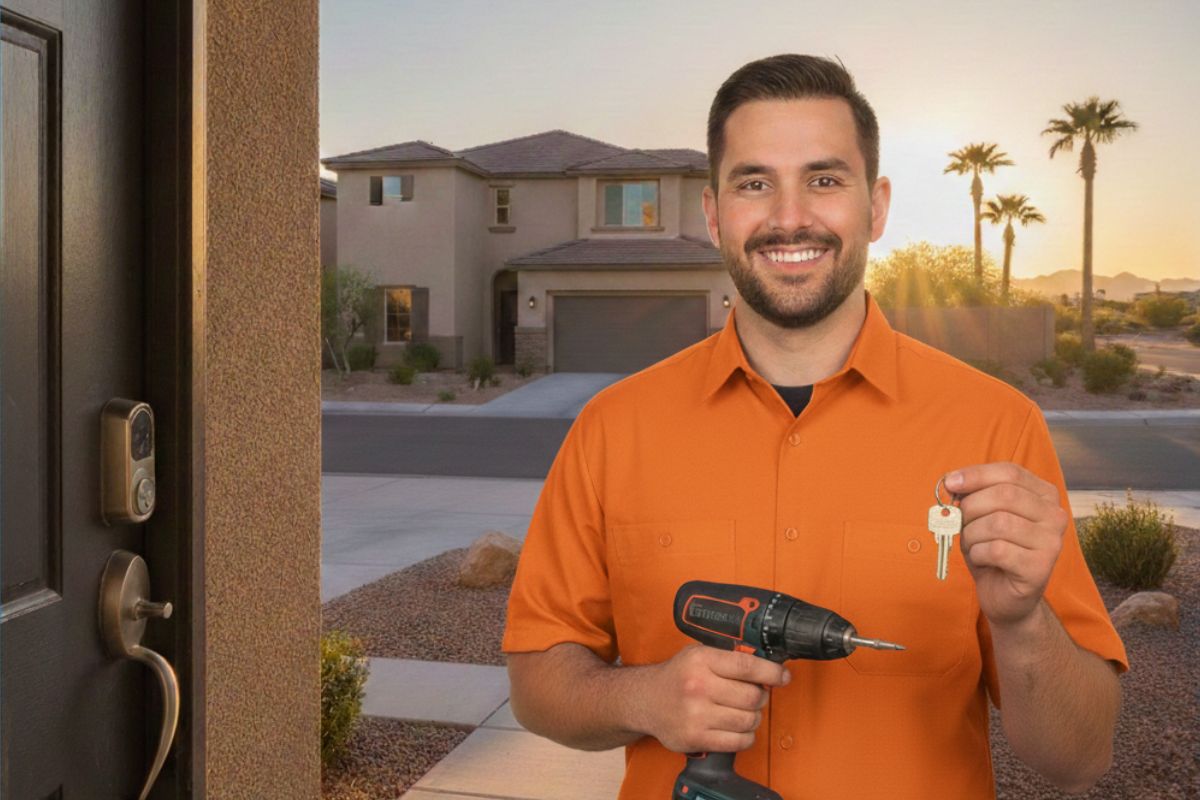
Smart Locks with Cameras: The Future of Front Door Security

Most homeowners in Mesa have stood at their front door at some point, realizing their deadbolt answers one question — is this door locked? — but leaves a bigger one completely open: who is standing on the other side right now? A missed delivery, an unrecognized face, or a stranger testing door hardware are all scenarios a traditional lock cannot address on its own. Smart locks with cameras solve that gap by combining keyless access control with real-time visual verification in a single device mounted where your existing deadbolt already lives. Keep reading for a complete breakdown of how these systems work, what features actually matter for home safety in Mesa, and why the installation step deserves a trained professional locksmith.

What Are Smart Locks with Cameras?

A smart lock with a built-in camera is exactly what the name describes: a door lock that integrates a video sensor — typically wide-angle, night-vision capable, and motion-triggered — directly into the lock body. Unlike a separate video doorbell paired with a separate smart lock, these combined units share a single power source, a single app interface, and a single mounting footprint on your door.

The lock side typically uses one of two mechanisms: a motorized deadbolt that extends and retracts on command, or a motorized thumbturn lock that mimics the interior turn knob you already use manually. Both can be triggered by a smartphone app, a keypad, a fingerprint reader, or a traditional physical key — giving you multiple access methods rather than dependency on any single one.

Leading manufacturers including Schlage, Yale, and Level have each introduced models that blend deadbolt security with integrated optics. The ASSA ABLOY group, which owns several of these brands, has published independent testing data confirming that modern smart deadbolts meet or exceed ANSI/BHMA Grade 1 standards — the highest residential classification for pick resistance, drill resistance, and forced entry.

For homeowners in Mesa who rely on our residential locksmith services, we’ve installed dozens of these systems over the past several years. The questions we hear most often fall into two categories: security and reliability. Both are addressable with the right hardware choices and correct installation.

Key Features That Define Smart Locks with Cameras

Not all products marketed as smart locks with cameras deliver the same level of deadbolt security. These are the specifications worth scrutinizing before you purchase:

Video resolution and field of view. A minimum of 1080p resolution with a 150° or wider field of view captures enough of a porch or entryway to identify faces and packages clearly. Narrower lenses miss activity at the edges of the frame.

Night vision. Mesa’s evenings and early mornings are low-light environments for most of the year. Infrared or color night vision keeps the camera useful after dark without requiring additional exterior lighting.

Motion detection zones. The ability to define specific detection areas — a porch step rather than a passing car — reduces unnecessary alerts while keeping focus on genuine activity at your door.

Local vs. cloud storage. Some systems store video footage exclusively on cloud servers with a subscription requirement. Others offer a local SD card or hub-based backup. For home safety purposes, having a copy of footage that doesn’t depend on a subscription or internet uptime is a meaningful advantage.

Encryption and authentication. Look for systems that use end-to-end encryption for video streams and require multi-factor authentication for app access. The ALOA (Associated Locksmiths of America) recommends treating smart lock firmware like any other connected device — update it regularly and use strong, unique credentials.

Feature Traditional Deadbolt Smart Lock with Camera
Visual Verification None Built-in wide-angle camera
Remote Access Not possible Smartphone app or keypad
Entry History Log None Timestamped digital records
Guest Access Physical key copy required Temporary digital codes
Night Visibility None IR or color night vision
ANSI/BHMA Grade 1 Available on select brands Available on certified models
Thumbturn Lock Option Standard interior turn Available on select models
Forced Entry Resistance Grade-dependent Equivalent on Grade 1 models
Power Source None required Battery or hardwired
Remote Feature Dependency None Internet connection required

Pro Tip: Test the Camera Angle Before Finalizing the Mounting Height

One mistake we correct during installation calls is a camera mounted too high or too low relative to the average face height at the door. If the unit goes in at standard deadbolt height (typically 36–44 inches from the floor), the camera angle may capture the top of a visitor’s head rather than their face — especially on taller individuals. Before drilling the final mounting holes, hold the unit in position and check the live video feed on your phone. Adjust the height by a few inches if the frame clips the face zone. This is the single most common setup error we find on self-installed units, and it costs nothing to correct before the screws go in.

Professional Locksmith Installation: What Changes and Why It Matters

A smart lock with a camera is a more complex installation than a standard deadbolt swap. The door bore — the hole the lock cylinder passes through — must align precisely with the camera lens angle and the strike plate geometry. Misalignment by even a few millimeters can cause the deadbolt to bind under load, which accelerates wear on the motor and eventually produces a failure at the lock mechanism itself.

At Locksmith Near Me Mesa, our technicians also verify door frame alignment, strike plate depth, and whether the existing door prep accepts the new hardware without additional boring. Mesa’s temperature swings — triple-digit summers followed by cooler winters — cause wood and metal frames to expand and contract seasonally. A door that closes cleanly in January may bind in July. We account for that tolerance during installation, which prevents operational issues months down the line.

For homeowners who already have a smart lock installed and are experiencing intermittent failures, our lock repair and inspection service identifies whether the issue is mechanical, firmware-related, or a door alignment problem — and we resolve it at the source rather than replacing hardware unnecessarily.

Smart Locks with Cameras as Part of a Complete Home Safety Plan

A single smart lock with a camera is a significant improvement over a standard deadbolt, but it functions best as one layer in a broader home safety strategy. The most effective setups we see combine the camera lock at the primary entry point with secondary deadbolt security on side doors and sliding entries, a properly installed strike plate with 3-inch screws reaching the door frame stud, and a simple alarm system on windows and secondary entries.

If you’re evaluating your home’s full perimeter, our team conducts residential security assessments throughout Mesa and the East Valley. We document every entry point, grade the existing hardware against ANSI/BHMA benchmarks, and provide a prioritized list of improvements.

Ready to Upgrade Your Front Door?

Smart locks with cameras represent a genuine shift in what residential hardware can do. The combination of verified access control and visual monitoring changes the front door from a passive barrier into an active security checkpoint. The technology is sound, the product options are broad, and the installation process is well within reach for any experienced locksmith in Mesa.

If you’re ready to upgrade, or you’d simply like a professional assessment of your current front door setup before committing to a product, contact our team at Locksmith Near Me Mesa or find us directly on Google Maps. We’ll evaluate your door, your frame, and your existing hardware — and recommend the combination that makes the most sense for your home.

Frequently Asked Questions

Yes — when you select a model that carries ANSI/BHMA Grade 1 certification, the deadbolt mechanism itself meets or exceeds the same forced-entry resistance standards as the best traditional hardware. The camera and electronics add features on top of that mechanical foundation without weakening it. Our professional locksmiths in Mesa verify the Grade 1 rating and correct installation on every smart lock job we complete.

Most quality smart locks retain their core functions offline. The physical key, the thumbturn lock on the interior, and stored access codes on the keypad all continue to work without an internet connection. Remote app access and live video streaming require connectivity, but the lock itself does not become inoperable. We always confirm offline functionality during installation.

A licensed locksmith can install virtually any residential smart lock brand, including models from Schlage, Yale, Level, Ultraloq, and ASSA ABLOY. The installation process involves verifying door bore compatibility, strike plate alignment, and frame condition — factors that matter regardless of brand. Our Mesa team works with all major manufacturers and can advise on which model fits your door prep best.

Most smart lock bodies are designed to fit the standard 2-1/8-inch door bore that has been common in U.S. residential construction since the 1970s. Where older doors present challenges — non-standard bore sizes, deteriorated frames, or misaligned strike plates — a professional locksmith assesses those conditions before installation and identifies whether additional prep work is needed. Skipping that evaluation is the primary cause of smart lock operational failures on older doors.

Not on properly engineered products. Reputable manufacturers integrate the camera into the exterior escutcheon without modifying the bolt mechanism or cylinder geometry. The deadbolt security rating is preserved because the locking components remain structurally separate from the electronics. Confirm Grade 1 certification on any model you purchase rather than relying solely on marketing language.

Start by checking the app’s motion detection settings — sensitivity and detection zone configurations reset on some devices after firmware updates. If settings are correct and the issue persists, verify that the lock’s battery level is above 25%; low power affects camera performance before it affects the lock mechanism. If neither resolves the issue, our Mesa locksmith team can run a diagnostic and determine whether it’s a hardware or firmware problem.

home security Mesa AZ

Home Security Mesa AZ: The Ultimate Guide to Residential Protection

Overview: As Mesa grows, homeowners face evolving safety challenges. This guide provides a deep dive into local security trends, hardware upgrades, and proactive measures to fortify your residence against modern threats.

Enhancing Your Home Security in Mesa, AZ: A Strategic Approach

In Mesa, protecting your property is a top priority for every homeowner. Whether you live near the vibrant downtown area or in the quiet suburbs of East Mesa, maintaining robust home security Mesa AZ standards is essential to deterring intruders. We understand that a house is more than just a building; it’s a sanctuary. That is why we have compiled this expert resource to help you navigate the complexities of modern residential locksmith solutions and security protocols. Our goal is to empower you with the knowledge needed to make informed decisions about your family’s safety.

Expert Commitment: “Every repair is handled by a licensed and insured technician who takes the time to inspect your problem before starting any work.” This ensures that your home security Mesa AZ infrastructure is not just installed, but engineered for maximum reliability.

Why Local Context Matters for Mesa Residents

Mesa, Arizona, presents unique environmental and situational factors that affect security hardware. The extreme heat of the Sonoran Desert can degrade cheaper plastic components in digital locks, and local crime patterns often dictate which entry points are most vulnerable. By focusing on high-quality services, you ensure that your hardware stands up to both the elements and potential threats.

Common Vulnerabilities in Arizona Homes

  • Sun-Damaged Seals: Weather stripping that cracks in the heat can make doors easier to pry.

  • Standard Grade 3 Locks: Many builders install the cheapest locks available, which are easily bypassed by “bumping.”

  • Sliding Glass Doors: A common feature in Mesa homes that serves as a primary entry point for burglars if not properly reinforced.

Security Component Standard Setup High-Security Upgrade
Deadbolts Grade 3 (Consumer) Grade 1 (Commercial Strength)
Door Frames Pine with 1/2″ screws Reinforced Steel Strips + 3″ screws
Key Control Keys duplicatable anywhere Restricted Keyways (Patented)

Layered Security: The “Defense in Depth” Model

Effective home security Mesa AZ isn’t about one single “unbreakable” lock; it’s about creating layers that make your home an unattractive target.

1. Perimeter and Lighting

The first layer starts at your property line. Motion-activated lighting is particularly effective in Mesa’s residential neighborhoods. Use LED fixtures that illuminate dark corners without creating glare that hides intruders.

2. High-Security Hardware

We recommend upgrading to pick-resistant and drill-resistant cylinders. Brands like Medeco or Mul-T-Lock provide a level of physical resistance that standard hardware stores simply cannot match. If you are a business owner in the area, you might also consider commercial locksmith grade hardware for your home office.

3. Smart Integration

Smart locks allow you to monitor who enters and leaves your home in real-time. This is invaluable for tracking dog walkers, contractors, or kids coming home from school. However, ensure your Wi-Fi network is encrypted to prevent digital intrusions.

  • Strike Plate Reinforcement: Replace standard strike plates with heavy-duty versions using 3-inch screws that anchor deep into the wall stud.
  • Window Security Film: Apply a transparent security film to make glass shatter-resistant.
  • Smart Doorbells: Act as a visual deterrent and provide video evidence of any suspicious activity.

Technical Maintenance of Mesa Residential Locks

Arizona’s dust and heat can cause internal lock components to seize. We advise against using oil-based lubricants, which attract desert grit. Instead, use dry Teflon or graphite-based lubricants. Regular check-ups by a licensed technician can prevent emergency lockouts.

If you find yourself in a situation where your security has been compromised, or you’ve simply lost your keys, knowing a reliable automotive locksmith or residential specialist is crucial. You can find our primary location on the [enlace sospechoso eliminado].

The Importance of Professional Assessment

While DIY security kits are popular, they often miss critical structural weaknesses. A professional contact us consultation allows us to identify “blind spots” in your current setup. For instance, many people forget to secure the door leading from the garage into the house, which is a frequent entry point for burglars who manage to open the garage door.

Improving Home Security Mesa AZ: Long-Term Strategies

To maintain high levels of home security Mesa AZ, you must treat it as an ongoing process rather than a one-time project. As technology evolves, so do the methods used by intruders.

  • Audit your keys: If you’ve recently moved in, rekeying is the first step to ensuring you have total control over who has access.

  • Update Codes: If using keypad locks, change your master codes every six months.

  • Community Awareness: Join local Mesa neighborhood watch programs to stay informed about recent activity in your specific ZIP code.

Frequently Asked Questions (FAQ)

What is the best lock for Mesa’s extreme heat?

High-grade metal locks with PVD finishes are best. Avoid locks with heavy plastic exterior components, as they can warp or become brittle under the Arizona sun.

How often should I rekey my home in Mesa?

We recommend rekeying whenever you move into a new property, lose a set of keys, or have a change in household residents.

Are smart locks secure enough for Mesa neighborhoods?

Yes, provided they are Grade 1 or 2 certified and use two-factor authentication for their digital apps.

How can I secure my sliding patio door?

Use a secondary locking bar (charlie bar) and anti-lift blocks to prevent the door from being lifted off its tracks.

Does a security system reduce my insurance?

Most Arizona insurance providers offer discounts for homes with monitored alarm systems and deadbolts on all exterior doors.

What is a “bump-proof” lock?

These locks feature specialized internal pins or sidebars that prevent “lock bumping,” a common technique used by intruders to open standard pin-tumbler locks.

Should I install security cameras myself?

While DIY is possible, professional placement ensures no blind spots and proper integration with your physical locks.

How do I know if my locksmith is legitimate?

Always check for a physical address in Mesa, a valid business license, and insurance. Our team at Locksmith Near Me Mesa AZ meets all these criteria.

Your Partner in Home Security Mesa AZ

Securing your home is a journey that requires vigilance and the right professional partnership. By implementing a layered defense—from reinforced strike plates to smart monitoring—you significantly reduce the risk of burglary. Remember, home security Mesa AZ is most effective when it is customized to your specific property layout and lifestyle. We are committed to providing the Mesa community with the expertise and high-quality hardware needed to sleep soundly at night.

Ready to Fortify Your Mesa Home?

Don’t wait for a security breach to happen. Contact our expert team for a comprehensive residential audit.

Explore Residential Solutions